Creating Multiple Rank Tables
Configure Initial Settings
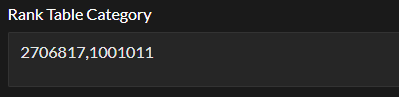
In Radiant settings, under the "rank table settings" tab, paste 2 (or more) table IDs. Separate each by a comma, like in the image below.
Open Template Editor
Under the template (opens in a new tab) section the Tebex panel, click "edit". Then click "launch editor".
Duplicate the table code
In tableAddon.twig, find the JSON object named ranks (starting around line 3). Duplicate that entire block of code and paste it below the ranks object. Ensure to rename it to something different, such as ranks_1.
Change the category ID
In the new ranks_1 object, change the category ID to match the ID of the category you want the new table to be displayed on.
Configuration File Sample
Your config file could look something like this:
{% set tableAddonConfiguration = {
disabledPackages: ["5309869"],
ranks: {
    category: "2706817",
    tables: {
        table_1: {
            tableTitle: "Global",
            perks: {
                row_1: {
                    category_description: "In game color",
                    category_title_tooltip: "In game color description",
                    packages: {
                        perk_1: {
                            rank_tag: true,
                            rank_tag_color: "#fa75db",
                            icon: false,
                            iconId: '<i class="fa-solid fa-circle-xmark" data-feature-icon="not-check"></i>',
                            text: "Vip",
                        },
                        perk_2: {
                            rank_tag: true,
                            rank_tag_color: "#2196f3",
                            icon: false,
                            iconId: '<i class="fa-solid fa-circle-check" data-feature-icon="check"></i>',
                            text: "Mvp",
                        }
                    }
                },
                row_2: {
                    category_description: "/fw Command",
                    category_title_tooltip: "In game color description",
                    packages: {
                        perk_1: {
                            rank_tag: false,
                            rank_tag_color: "#fa75db",
                            icon: true,
                            iconId: '<i class="fa-solid fa-circle-xmark" data-feature-icon="not-check"></i>',
                            text: "Vip",
                        },
                        perk_2: {
                            rank_tag: false,
                            rank_tag_color: "#2196f3",
                            icon: true,
                            iconId: '<i class="fa-solid fa-circle-check" data-feature-icon="check"></i>',
                            text: "Mvp",
                        }
                    }
                }
            }
        },
        table_2: {
            tableTitle: "Factions",
            perks: {
                row_1: {
                    category_description: "In game color",
                    category_title_tooltip: "",
                    packages: {
                        perk_1: {
                            rank_tag: true,
                            rank_tag_color: "#fa75db",
                            icon: false,
                            iconId: '<i class="fa-solid fa-circle-xmark" data-feature-icon="not-check"></i>',
                            text: "Vip",
                        },
                        perk_2: {
                            rank_tag: true,
                            rank_tag_color: "#2196f3",
                            icon: false,
                            iconId: '<i class="fa-solid fa-circle-check" data-feature-icon="check"></i>',
                            text: "Mvp",
                        }
                    }
                }
            }
        },
    }
},
ranks_2: {
    category: "2706818",
    tables: {
        table_1: {
            tableTitle: "Global",
            perks: {
                row_1: {
                    category_description: "In game color",
                    category_title_tooltip: "In game color description",
                    packages: {
                        perk_1: {
                            rank_tag: true,
                            rank_tag_color: "#fa75db",
                            icon: false,
                            iconId: '<i class="fa-solid fa-circle-xmark" data-feature-icon="not-check"></i>',
                            text: "Vip",
                        },
                        perk_2: {
                            rank_tag: true,
                            rank_tag_color: "#2196f3",
                            icon: false,
                            iconId: '<i class="fa-solid fa-circle-check" data-feature-icon="check"></i>',
                            text: "Mvp",
                        },
                        perk_3: {
                            rank_tag: true,
                            rank_tag_color: "#d14841",
                            icon: false,
                            iconId: '<i class="fa-solid fa-circle-check" data-feature-icon="check"></i>',
                            text: "Mvp+",
                        },
                    }
                },
                row_2: {
                    category_description: "/fw Command",
                    category_title_tooltip: "In game color description",
                    packages: {
                        perk_1: {
                            rank_tag: false,
                            rank_tag_color: "#fa75db",
                            icon: true,
                            iconId: '<i class="fa-solid fa-circle-xmark" data-feature-icon="not-check"></i>',
                            text: "Vip",
                        },
                        perk_2: {
                            rank_tag: false,
                            rank_tag_color: "#2196f3",
                            icon: true,
                            iconId: '<i class="fa-solid fa-circle-check" data-feature-icon="check"></i>',
                            text: "Mvp",
                        },
                        perk_3: {
                            rank_tag: false,
                            rank_tag_color: "#d14841",
                            icon: true,
                            iconId: '<i class="fa-solid fa-circle-check" data-feature-icon="check"></i>',
                            text: "Mvp+",
                        },
                    }
                }
            }
        }
    }
},
} %}